

Store data between runs
By default a workflow is amnesiac — every run starts fresh and forgets the last one. A document store gives it a memory: your own named collections of JSON documents that persist across runs and across chat sessions. One workflow writes to a collection, another reads it back, and in chat you can list and correct what’s in it — all sharing the same data.
Two new nodes do the writing and reading, both under Integration in the palette:
- Store Document — saves a JSON document into a collection.
- Query Documents — reads documents back out.
And chat has a built-in User Datastore tool that lists, inspects, and edits the same collections in plain language.
Collections
Section titled “Collections”A collection is a named bucket of JSON documents that belongs to you, not to any one
workflow. Names are snake_case and start with a letter — food_log, expenses,
weight_entries. Because collections outlive workflows, name them after the data, not the
workflow that happens to produce it: food_log, never calorie_analyzer_output. That naming is
what lets a separate reporting workflow find the data later.
A worked example: a food-photo calorie log
Section titled “A worked example: a food-photo calorie log”This is the whole loop end to end — a workflow that logs each meal, the same workflow reading the log back for a running summary, and chat correcting an entry. It builds on Build your first workflow and the File & image inputs page.
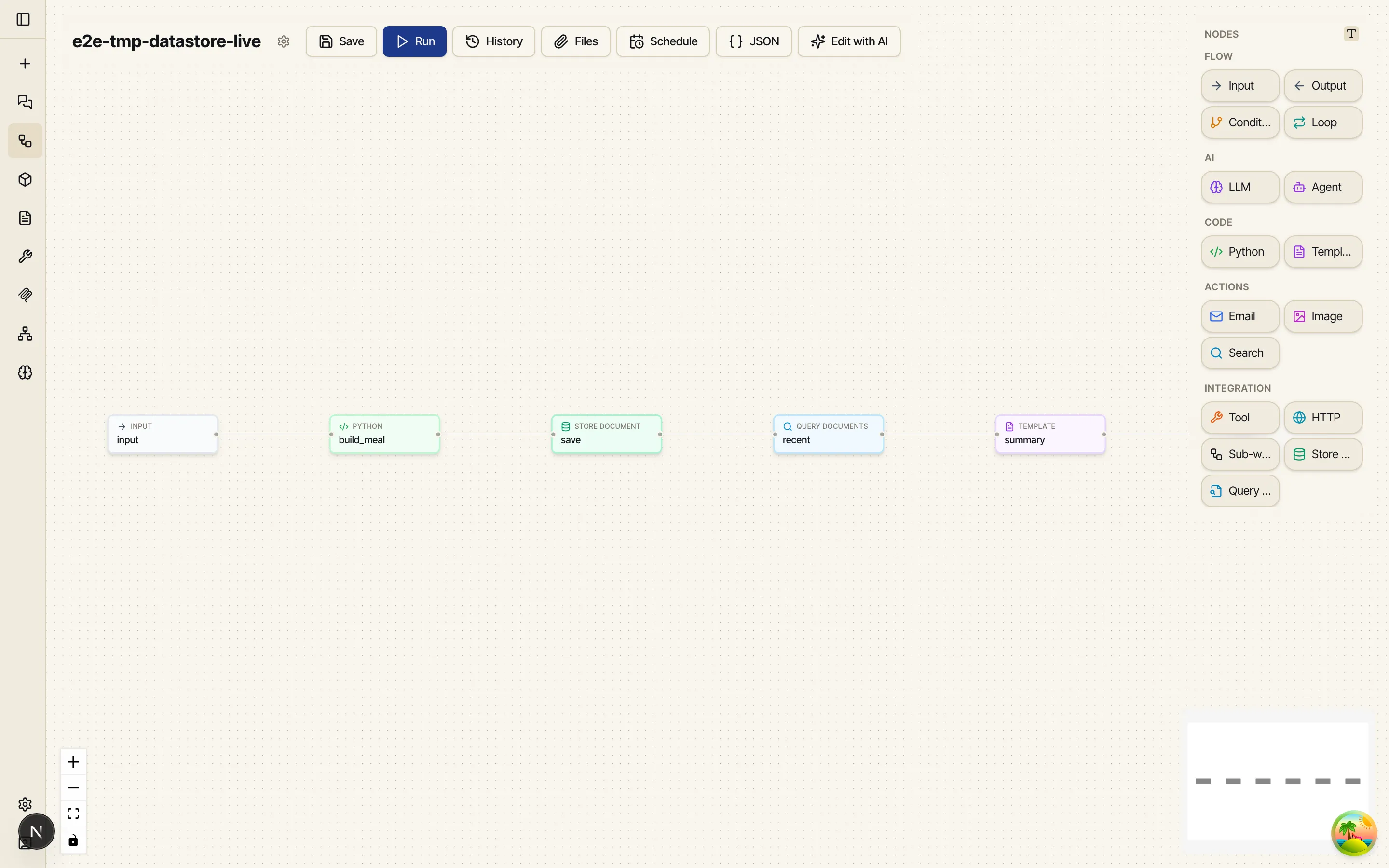
The graph is six nodes: Input → Python → Store Document → Query Documents → Template → Output.
A photo (or a description) comes in, a Python node builds a tidy JSON document for the meal,
Store Document appends it to food_log, Query Documents reads the recent log back, and a
Template renders a short summary.
Store a document
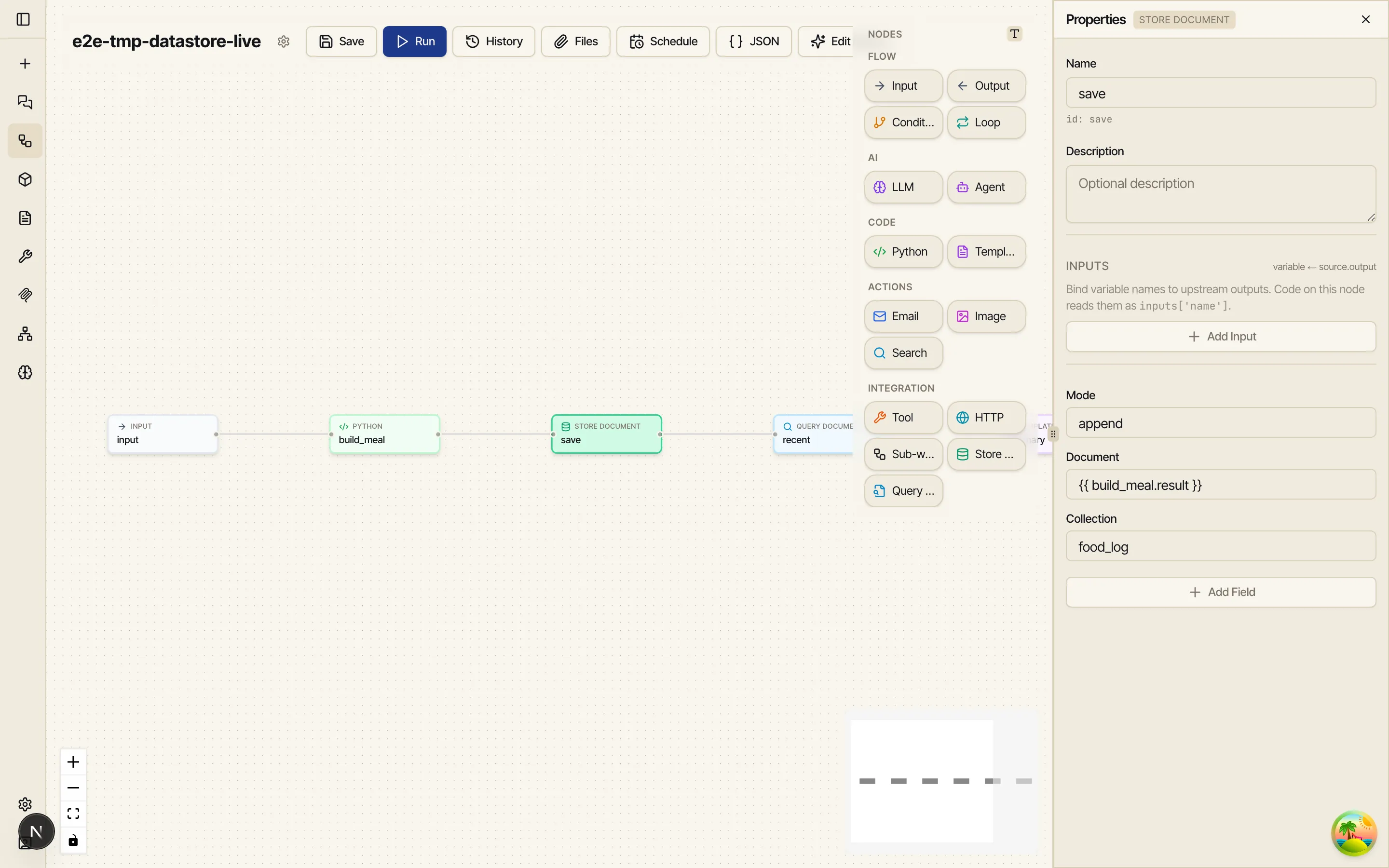
Section titled “Store a document”Drag a Store Document node on, wire it after the node that builds your meal JSON, and open Properties. It takes four fields:
- Collection —
food_log. snake_case, named after the data. - Document — the JSON object to store. Usually a node reference to the structured result
upstream, here
{{ build_meal.result }}. (A whole-object reference arrives as JSON; a string that’s valid JSON is parsed too.) - Mode —
append(the default) writes a new document every run, so each meal becomes its own entry.upsertinstead overwrites the document matching a key — use it for current-state data like a daily total. - Key — only for
upsert: a stable identifier (e.g. the ISO date for a once-a-day summary). Leave it empty forappend.
Store Document publishes id (the stored document’s id), doc (what was stored), and
created — true when a new document was written, false when an existing one was updated.
Query it back
Section titled “Query it back”Drag a Query Documents node on and point it at the same collection. Beyond Collection it takes optional filters:
- Key — fetch the single document with that key.
- Since / Until — an ISO date or datetime bound on when documents were written
(e.g.
since= seven days ago for a weekly report). - Where — a JSON containment filter, e.g.
{"meal_title": "Lunch"}. - Order —
newest(default) oroldest. - Limit — how many to return (default 50, max 500).
Query Documents publishes docs (the matching documents — each carries id, key, doc,
created_at, updated_at), count, and first (the newest document’s body, handy for
single-document lookups). Feed docs into a Python node to aggregate
or a Template node to render.
Run it — and watch it remember
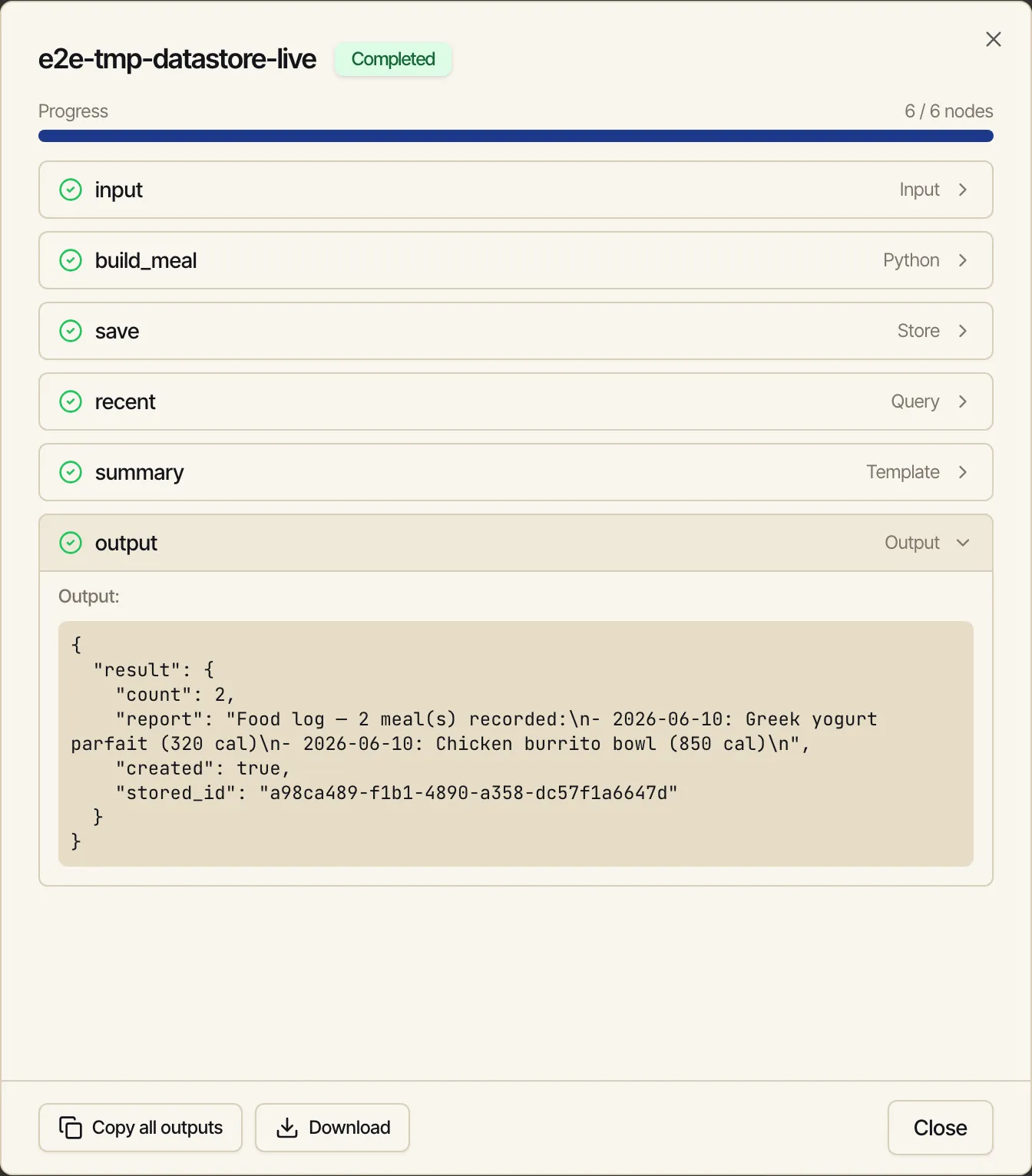
Section titled “Run it — and watch it remember”Run the workflow once, then change the input and run it again. Because Store Document is in
append mode, the second run doesn’t replace the first — it adds to food_log. The Query +
Template nodes then report both meals back. Here the run output shows count: 2 after two runs,
proving the data carried across them:
A separate workflow — say a weekly report you schedule and
email — can point its own Query Documents node at the very same
food_log collection and aggregate everything logged so far. The reporter never needs to know how
the data was produced; it only needs the collection name and the shape of the documents.
The query gotcha: top-level variables in templates
Section titled “The query gotcha: top-level variables in templates”This one trips people up. When a Template (or Python) node sits downstream of a Query
Documents node, the query’s outputs arrive as top-level template variables — docs,
count, and first — not nested under the query node’s name. So loop over the bare name:
{% for d in docs %}- {{ d.doc.date }}: {{ d.doc.meal_title }} ({{ d.doc.total_calories }} cal){% endfor %}Total meals: {{ count }}Writing {% for d in query_node.docs %} will not work — inside Jinja control tags ({% %})
you use the bare input names. The familiar {{ node_id.field }} reference form still works for
simple {{ }} substitutions in a node’s config fields; it’s only inside {% %} control tags that
you drop the node prefix and use docs / count / first directly.
Correct entries in chat
Section titled “Correct entries in chat”The same collections are reachable from chat through the built-in User Datastore tool. Ask the assistant to list your collections, summarize one, or fix an entry, and it queries and edits the documents directly — no SQL, no workflow run.
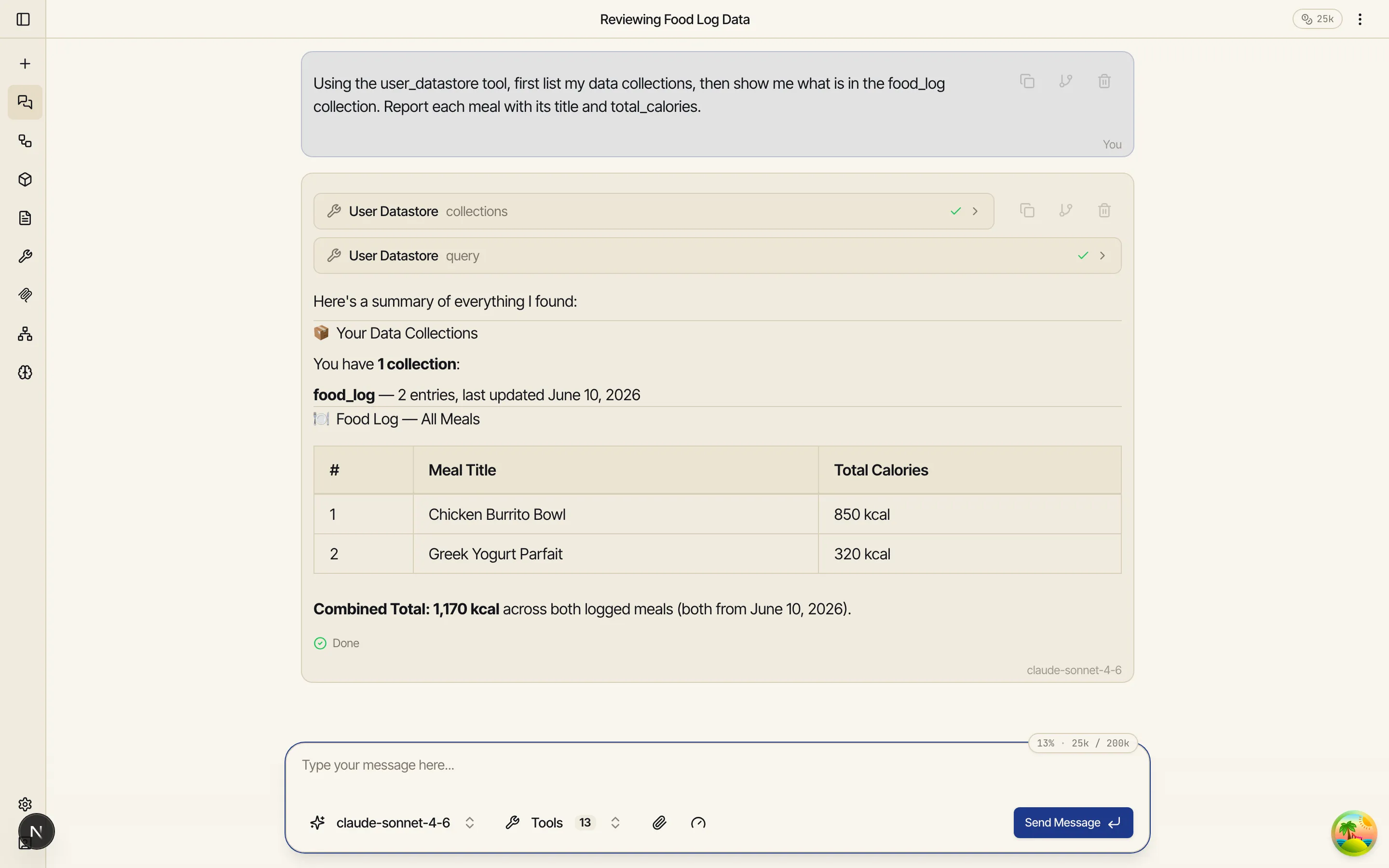
Conversational corrections are the point. Say “the burrito bowl was actually 425 calories” and
the assistant queries food_log, finds that meal, and updates the document in place — it
doesn’t append a duplicate to “fix” the old one. The tool can list collections, query, insert,
update (replace the whole document or merge a partial fix), and delete a stray entry by id.
Totals and trends are computed in the database, not by reading every entry: ask “how many calories did I have this week, per day?” and the assistant runs a single aggregate — sum, average, min, max, or count over any document field, optionally grouped (per day, per meal) and filtered by date range. Your logs can grow for years without reports getting slower or chattier.
When to store (and when not to)
Section titled “When to store (and when not to)”Store only data you’ll want across runs — logs, trackers, journals, running totals.
Intermediate workflow values, one-off answers, and already-rendered HTML don’t belong in a
collection: keep the structured data and re-render the presentation from it whenever you need
it. A good document keeps a top-level date (the domain date — when the meal was eaten, not when
it was logged) and its key metrics at the top level, with any nested detail below.
Related
Section titled “Related”- Mini apps — turn a collection into a little app: a page with buttons that run your workflows and tiles, lists, and charts that read the data back.
- Node reference — Store Document and Query Documents in the full node catalogue.
- Scheduling and Delivery & files — turn a reporting workflow into a recurring email that simply shows up.
- Skills — the
data-collectionsskill the assistant uses.